BILT: 3D Instructions
- 4.3
- Rating
- 1.00M
- Installs
- Free
- Price

 Analysis by App-foxy
Putting together furniture or handling a home project is usually less about owning the right tools and more about understanding the instructions at the exact moment you need them. That is where BILT: 3D Instructions takes a different approach. Developed by BILT Inc., this free Lifestyle app turns supported product manuals into interactive, three-dimensional guidance instead of leaving you to decode flat drawings and dense paragraphs.
I found the idea especially useful in a household where more than one person helps with a project. One person can hold a panel, another can follow the visual steps, and both can look at the same assembly sequence without passing around a paper booklet. The app is not a universal repair encyclopedia, though. Its value depends on whether the product you own has an available BILT guide, so I would treat it as a practical companion for compatible purchases rather than a complete home-maintenance library.
How BILT fits into a real shared household project
Imagine bringing home a flat-packed cabinet on a weekend. Instead of opening a manual on the floor and trying to match tiny symbols to similar-looking boards, I would use BILT as the central reference while sorting the parts. The three-dimensional presentation makes it easier to understand orientation: which face points outward, where a hole should be, and how a piece should rotate before it is attached.
You May Also Like

 Blood Strike: 2.5 Anniversary
Blood Strike’s Loadouts Turn Every Drop Into a Tactical Gamble
A close look at Blood Strike’s custom loadouts: how fast access to signature weapons reshapes its battle royale rhythm, rewards preparation, and narrows the gap between fights.

 Pandora - Music & Podcasts
Pandora’s Music Is Easy to Start, but Harder to Recover
Pandora’s strength is its low-effort path from a seed to a station. Its weak spot is how much confidence it asks you to place in connection, setup, and quiet recovery.

 8 Ball Pool
 Is Built on Rivalries, Rematches, and Routine
A close look at the rivalries, rematches, shared routines, and unanswered safety questions that turn a quick pool match into a persistent mobile community.

 Samsung Music
’s Quiet Strength Is Playing What You Already Own
Its reach comes less from spectacle than from dependable access to a personal library. That simplicity is both the app’s strongest retention engine and its ceiling.

 AccuWeather: Weather Radar
AccuWeather Review: A Quick, Clear Forecast for Everyday Decisions
For everyday plans, the best forecast is the one you can understand quickly. AccuWeather makes rain timing, radar, and local conditions easy to act on, with a few trade-offs.

 Hill Climb Racing
Why Hill Climb Racing Still Turns Crashes Into One More Run
A tiny car, a bumpy hill and one more upgrade: Hill Climb Racing keeps resurfacing because its simple chaos makes every near-miss feel personal.
More From Our News Desk



That matters more when two people are working together. Traditional instructions often create a small but annoying problem: one person reads the page while the other asks for repeated clarification. With an interactive guide, I can pause at the relevant step, inspect the model, and show the other person exactly what I mean. It does not replace communication, but it gives the conversation a shared visual reference.
A useful habit is to review the guide before opening every packet of hardware. I would first identify the larger components, then check the early steps to see which screws, dowels, brackets, or tools appear first. This reduces the common mistake of mixing similar fasteners on the floor. The app is most helpful when used as a planning tool, not merely as a screen to glance at after something has already gone wrong.
The interactive format also helps with left-and-right confusion. A printed diagram can look correct even when the panel is reversed, especially if both sides have a similar finish. Rotating the digital model gives me another way to verify the position before tightening anything. That is a small advantage, but it can save a considerable amount of disassembly later.
For a shared device, I would place the phone or tablet where both people can see it without forcing either person to stop working constantly. The person handling the parts can ask the other to advance the guide, or the person reading can keep the instructions visible while the assembler works. This division is simple, but it makes BILT feel more useful than a conventional document when the project involves awkward pieces or several assembly stages.
What the three-dimensional view improves
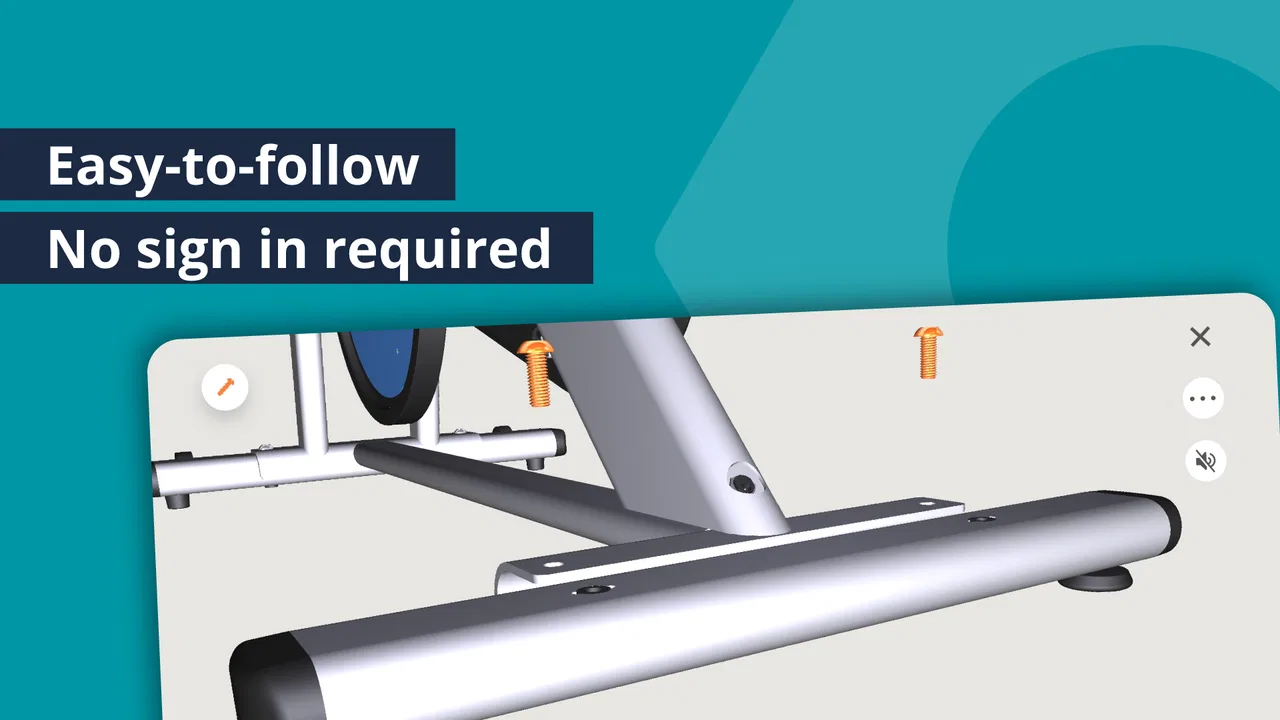
The strongest part of the experience is spatial understanding. BILT is not just displaying a page with a picture; its central appeal is being able to follow an object as a sequence of physical actions. That approach is particularly helpful for products with overlapping panels, concealed fittings, or components that look nearly identical when laid out separately.
I would still keep the actual manual, labels, and hardware nearby. The app can clarify the assembly sequence, but the physical product remains the authority for checking part markings and safety instructions. If a component does not match the model on screen, I would stop rather than assume the difference is harmless. Interactive guidance is easier to interpret than many paper manuals, but it does not remove the need to inspect what is in front of me.
Another practical benefit is the ability to work at a slower pace. A paper page encourages me to keep looking back and forth between the illustration and the object. With a digital guide, I can leave the current step visible while positioning a part. That is useful for beginners, older relatives who prefer visual explanations, or anyone who finds technical diagrams tiring to follow.
Setting up without creating confusion
Before starting, I would make a clear boundary between the app and the project itself. BILT can guide the instructions, but it does not make decisions about whether a wall is suitable, whether a tool is safe to use, or whether a damaged part should be installed. Those judgments remain with the person doing the work.
The initial setup is best handled by the person who will organize the project. I would search for the product, select the relevant guide, and confirm that the model shown resembles the item in the room before inviting someone else to help. This avoids a shared-device situation where one person begins following the wrong guide while another is already sorting parts.
It is also worth deciding who controls the screen. If several people are touching the same device, the guide may advance unexpectedly or the view may rotate at an unhelpful moment. In my experience, one person acting as the instruction keeper works better than everyone trying to navigate at once. The other person can focus on the physical assembly and ask for a closer look when needed.
Because this is a household-oriented use case, account boundaries deserve some thought. I would avoid treating one shared device as if it automatically represents every person using it. Keep the app’s role limited to the project, and do not assume that another family member should manage any account-related action simply because they are holding the phone. Shared access is convenient, but clear responsibility prevents accidental changes or confusion about who started a guide.
For a temporary project, a guest helper may only need to see the current steps. I would not hand over broader access than necessary. This is not a criticism of BILT specifically; it is a sensible way to manage any application used by several people on one device. The best arrangement is usually straightforward: one person prepares the guide, one person navigates it, and everyone confirms physical parts together.
Coordinating the work step by step
BILT works best when the app becomes a coordination board rather than a silent manual. Before each major step, I would name the part, identify the hardware, and check the orientation on screen. Then the person holding the component can position it while the other person verifies the view. This three-part rhythm—identify, position, confirm—helps prevent rushed mistakes.
For a larger piece of furniture, I would divide the project into natural handoffs. One person can prepare hardware while another assembles the frame. When a step requires two hands, the screen holder can read the sequence and keep the model visible. When the work becomes repetitive, swapping roles can reduce fatigue and gives both people a chance to understand the construction.
A less obvious advantage is that the visual guide can expose a disagreement early. If two people interpret a paper drawing differently, they may force a panel into place and only discover the error several steps later. With the model available, both can inspect the intended angle before applying pressure. That is particularly valuable for parts that fit in more than one apparent direction but only one correct direction.
I would also use the app to decide when not to proceed. If the next illustration shows a part that is missing, damaged, or visibly different from what is on the floor, pausing is safer than improvising. The guide helps identify the expected step, but it cannot validate the condition of a real screw, board, bracket, or wall. The trade-off is clear: BILT improves interpretation, while the user still has to perform quality control.
On a shared tablet, the larger display can make the three-dimensional model easier for two people to inspect. On a phone, the guide may be more convenient to carry but less comfortable when both users need to study a small detail. I would choose the device based on the project, keeping it stable and away from dust, loose hardware, and wet surfaces. This is a simple practical consideration, but it has more effect on the experience than switching between different viewing angles repeatedly.
Age, trust, and sensible supervision
The app has an Everyone content rating, which makes its subject matter broadly suitable for ordinary household use. That does not mean every task is appropriate for every age. A child may enjoy rotating the model or helping identify a numbered part, but I would not treat the age rating as permission to hand over tools, heavy panels, or responsibility for structural decisions.
For younger helpers, I would give BILT a limited role: find the next illustrated piece, count visible components, or tell the adult which direction the model is facing. This turns the app into a way to participate without pretending that visual instructions replace supervision. The same approach can work with someone who is new to assembly and needs confidence before taking on a more demanding step.
Trust also matters between adults. If one person is comfortable with tools and another is more familiar with phones, the app can divide the work naturally. But the person navigating the guide should not automatically become the person making every technical decision. I prefer a two-person check for steps involving load-bearing pieces, wall attachment, or anything that could cause damage if installed incorrectly.
For older family members, the visual sequence may be easier than a compact printed diagram, especially when the product has several similar-looking parts. I would enlarge the device view where possible and avoid rushing through animations or transitions. The aim is not to finish each step quickly; it is to make the physical action understandable and repeatable.
The app’s broad age context is therefore helpful but limited. It says more about the general nature of the content than about the safety of a particular project. BILT can be shared across a household, but responsibility should remain with an adult who can assess tools, weight, stability, and the condition of the product.
Where it stands against ordinary manuals and video searches
Compared with a printed manual, BILT’s main advantage is perspective. A page gives me a fixed illustration, while the three-dimensional approach is better suited to checking orientation and sequence. Paper still has two practical strengths: it does not need charging, and it stays available even when the device is being used for another task. I would keep both options nearby when possible.
Compared with general video tutorials, BILT is more closely tied to the product guide rather than someone else’s version of a similar project. That can reduce the risk of following a visually convincing but incompatible method. Videos may be better when I need broader advice, such as choosing a tool, repairing a damaged surface, or solving a problem that appears after assembly. BILT is more focused: it helps me follow the intended instructions for a supported product.
Compared with searching through image results, the app offers a more organized path. Searching can be fast when I know the exact model, but it often produces fragments, outdated diagrams, or instructions for products that only look similar. BILT is preferable when I want a guided sequence rather than a collection of disconnected pictures.
The trade-off is coverage. A universal manual app would be more flexible across brands and household tasks, while BILT is most compelling when the product already has a compatible interactive guide. I would check that fit before planning an entire project around it. If the item is unsupported, a manufacturer manual or a carefully chosen video may be the better route.
Performance expectations and practical friction
The app is free, which makes trying it before a project easy. It has reached over a million installs, and its average rating is 3.6 from around eight thousand ratings, with roughly three thousand reviews. Those figures suggest that the concept has broad interest but that the experience is not universally effortless. I would interpret that as a reason to test the guide before spreading parts across the floor, not as a reason to dismiss the app.
BILT was released on September 14, 2016, and the current version is 5.39.1. It supports Android 8.0 and later. For someone using an older phone or tablet, checking the operating system before a planned assembly session is sensible. A shared household device can be particularly vulnerable to this issue because it may not be the newest device in the home.
Interactive instructions also demand more attention than a static page. If the device is placed too far away, the user may spend more time walking back and forth than assembling. If it is too close to the work area, dust, fingerprints, or accidental touches can make navigation irritating. I would set the device at eye level or on a stable surface and keep the current step visible before picking up a tool.
Another limitation is that a digital model can create confidence without answering every real-world question. It may show where a part belongs, but it cannot feel whether a screw is cross-threaded or tell me that a board is warped. I would use the app for visual sequencing and the physical inspection for fit, stability, and finish.
Who should use it and who should choose something else
I recommend BILT to people who struggle with flat diagrams, households assembling products together, and anyone who wants to understand a product’s construction before committing to the next step. It is also a good fit for a friend helping with a project, because the visual guide gives both people a common reference without requiring one person to memorize the manual.
I would be more cautious about recommending it to someone looking for general home repairs, electrical guidance, decorating ideas, or a broad catalog of do-it-yourself lessons. That is not the role I would assign to this app. Its strength is the interactive handling of supported product instructions, not replacing every other source of practical knowledge.
If I were assembling a product alone and already comfortable with technical diagrams, the benefit would depend on the item. For a simple piece with obvious orientation, paper may be faster. For a complicated design with mirrored panels or many similar fittings, BILT becomes much more valuable. The right choice changes with the project, the user’s confidence, and the quality of the available guide.
For a family, I would also avoid presenting the app as a substitute for an adult’s judgment. Children can participate in safe, supervised ways, and older relatives may find the visuals approachable, but tools and heavy components still require sensible boundaries. The app helps coordinate people; it does not assign responsibility for them.
A household verdict after using the interactive approach
My overall view is positive, with one important condition: BILT is worth reaching for when it supports the product in front of me. Its three-dimensional instructions make orientation, sequencing, and shared assembly easier than many conventional manuals. In a household project, that can reduce the small misunderstandings that turn a straightforward job into a frustrating one.
I especially like the way it supports cooperation without forcing everyone to work in the same role. One person can navigate, another can handle the parts, and both can check the same visual model. That makes it useful for couples, roommates, relatives, and friends working around one device, provided they agree on who controls the guide and who makes the safety decisions.
The limitations are equally clear. Compatibility matters, a screen can be awkward around tools, and an interactive model cannot inspect the physical condition of a component. I would keep the original paperwork available, verify the product before starting, and stop whenever the real object disagrees with the illustration.
For me, the best reason to install BILT is not that it promises to make every project effortless. It is that it gives difficult instructions a more understandable shape. If you are about to assemble a supported household product and want a clearer way for several people to follow the same steps, this free app is a sensible tool to try. If you need broad repair advice or your product is not represented, a traditional manual or a carefully selected alternative will likely serve you better.
FAQs for BILT: 3D Instructions
01What is BILT: 3D Instructions and how does it work?
BILT: 3D Instructions is an innovative app that provides interactive 3D step-by-step instructions for assembling products. It utilizes a user-friendly interface to guide you through the assembly process, ensuring clarity and accuracy. The app allows you to zoom in, rotate, and view detailed instructions from various angles, making it easier to follow than traditional paper manuals.
02Is BILT: 3D Instructions free to use?
BILT: 3D Instructions is available as a free download on both Android and iOS platforms. While the app itself is free, some product instructions may require an in-app purchase to access premium features or additional content. The free version typically offers basic functionalities that are sufficient for most users.
03What types of products are supported by BILT: 3D Instructions?
The app supports a wide range of products, including furniture, electronics, household items, and more. BILT partners with various manufacturers to provide a comprehensive list of supported products. You can search for specific items within the app to see if instructions are available for your product.
04Do I need an internet connection to use BILT: 3D Instructions?
An internet connection is required to download the app and the specific instructions for each product. However, once the instructions are downloaded, you can access them offline. This feature allows you to use the app in areas with limited connectivity, making it versatile for different assembly environments.
05How user-friendly is BILT: 3D Instructions for beginners?
BILT: 3D Instructions is designed to be intuitive and accessible for users of all skill levels. The app provides clear, step-by-step instructions with visual aids, making it easy for beginners to follow along. Additionally, the ability to interact with 3D models helps users understand each step thoroughly, minimizing the risk of errors.
Pros
- Interactive 3D models make assembly easier.
- Step-by-step guidance reduces user errors.
- Supports a wide range of products.
- Offline access available for convenience.
- Regular updates with new instructions.
Cons
- Limited support for older product models.
- Requires significant storage space.
- Can be slow on older devices.
- Some instructions lack detailed images.
- No option to print instructions.

BILT: 3D Instructions
Gallery